Google Business Profile Audit
Google Business Profile Audit: Find What Is Holding Back Your Google Maps Visibility
Your Google Business Profile is often the first thing a nearby customer sees. RankBunny's profile audit checks every part of it, compares it with the businesses showing up ahead of you, and gives you a short list of the changes most likely to help, in plain English.
Get a free visibility checkRead the FAQWhat is a Google Business Profile audit?
A Google Business Profile audit is a structured review of your business listing on Google Search and Google Maps. It checks whether your name, address, phone number, categories, services, hours, photos, reviews and website link are complete, accurate and in line with Google's guidelines, then compares your profile with local competitors to find the gaps most likely to affect how often you appear and how many people contact you.
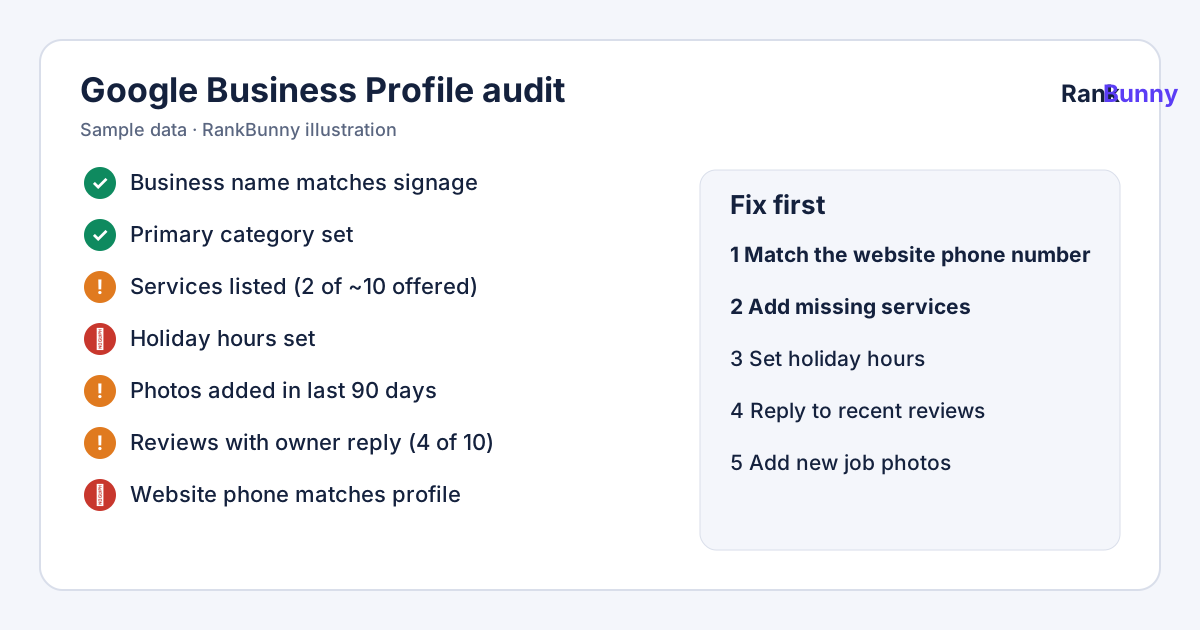
Why audit your Google Business Profile?
When someone searches for a service "near me" or in your town, Google usually shows a map with a short list of local businesses before the regular website results. Google says these local results are based mainly on three things:
- Relevance: how well your profile matches what the person searched for.
- Distance: how far your business is from the person searching, or from the location named in the search.
- Prominence: how well known your business is, which Google says includes information such as reviews and links from other websites.
You cannot change where a customer is standing, but you can control a lot of what makes your profile relevant and trustworthy. Most visibility problems we see come from things that are easy to miss: a primary category that does not match your main service, services that are not listed, hours that are out of date, or a profile with few recent photos and unanswered reviews. An audit finds those gaps in one pass, so you are not guessing.
An audit puts your effort into the parts of your profile that move you up the map.
What the RankBunny profile audit checks
The audit follows Google's own Business Profile guidelines and the practical checks local SEO professionals use. Each item is marked as passed, needs attention, or missing.
Business name, address and phone
Whether your name matches your real-world signage without extra keywords, your address or service area is set correctly, and the phone number matches your website.
Primary and secondary categories
Whether your primary category describes your core business, and how your categories compare with the businesses ranking near you.
Services and products
Whether the services you actually offer are listed, with clear names and descriptions customers would recognize.
Hours and special hours
Whether regular hours are filled in and holiday or special hours are set, so customers are not turned away by wrong information.
Business description
Whether the description explains what you do, who you serve and where, in natural language without keyword stuffing.
Photos and videos
Whether you have a logo, cover photo, exterior, interior, team and work photos, and how recently new photos were added.
Reviews and replies
Review count, average rating, how recent the latest reviews are, and how many reviews have an owner reply.
Posts and updates
Whether the profile shows recent updates or offers, which signal to customers that the business is active.
Attributes
Whether relevant attributes, such as accessibility details or service options, are filled in where Google offers them for your category.
Website and landing page
Whether the website link works on mobile, loads quickly, and the page it points to mentions the same name, address, phone number and services.
How the audit works, step by step
- Tell us your business and main service. We find your public profile on Google. If you become a client, you can connect your Google account so we can also read owner-only data such as your performance reports. You stay in control and can remove our access at any time.
- We check your profile against the guidelines. Rule-based checks cover completeness, accuracy and consistency. Rules are used for the checks because they are explainable and repeatable.
- We compare you with nearby competitors. We look at the public profiles of the businesses appearing ahead of you for your main search terms, so you can see where they differ from you. See local competitor analysis.
- We check where you appear on the map. A small local search grid scan shows how your visibility changes across your area for one or two important searches.
- You get a short, prioritized fix list. Each finding shows what we saw, why it matters and what to do. We use AI to help write clear explanations; the findings themselves come from the checks above. The list becomes your local SEO action plan.
What a finding looks like
A useful audit finding tells you what was found, the evidence, and the next step. A vague checklist item such as "optimize your categories" is not enough. Here is the format we use, shown with sample data:
| Finding | Evidence (sample) | Suggested next step | Priority |
|---|---|---|---|
| Services list is short | Your profile lists 2 services; the 3 businesses ahead of you list between 8 and 12. | Add each service you actually provide, using the words customers use. | High |
| Holiday hours not set | No special hours set for upcoming public holidays. | Add special hours, or confirm you keep regular hours. | Medium |
| Unanswered reviews | 6 of your last 10 reviews have no owner reply. | Reply to each review politely and specifically. | Medium |
| Website phone number differs | Profile and website show different phone numbers. | Use the same main number in both places. | High |
A quick Google Business Profile audit checklist you can do yourself
If you want to start on your own, these are the checks that most often make a difference. Open your profile in Google Search or the Google Maps app and work through them:
- Search your business name. Is the profile verified, and are the name, address and phone number correct?
- Is your primary category the most specific one that describes your main business?
- Are all of the services you actually provide listed?
- Are your regular hours correct, and are special hours set for holidays?
- Does your description say what you do, who you serve and where, in normal sentences?
- Have you added real photos of your premises, team and work in the last few months?
- Have you replied to your recent reviews, including the negative ones?
- Does your website link work, and does that page show the same name, address and phone number?
- Is there any duplicate profile for the same business or location?
- Do you have a plan to keep the profile current each month?
If you find more than a few problems, or you are not sure what "good" looks like in your area, a full audit with a competitor comparison saves time.
Why is my business not showing up on Google Maps?
This is one of the most common reasons owners ask for an audit. The usual causes are:
- The profile is not verified, or verification is pending.
- The profile is suspended or limited because something conflicts with Google's guidelines, such as a name with extra keywords or an address that is not a real customer-facing location.
- The searcher is far away. Distance matters, so you may appear for searches near your address and not across town. A local search grid shows where this happens.
- The categories or services do not match the search. If you are a "Plumber" but someone searches for "water heater repair", a missing service can make your profile less relevant.
- Competitors have stronger profiles for that search, for example more recent reviews or a better category match.
- A duplicate profile splits your reviews and information.
An audit separates these causes so you fix the right one first.
Who the profile audit is for
The audit is built for local businesses where a meaningful share of new customers comes from Google Search and Google Maps: home services, healthcare and dental practices, legal and financial offices, restaurants, salons, auto repair, and other service businesses with a physical location or a defined service area.
It is a good fit if you are not sure why competitors appear ahead of you, you have not reviewed your profile in a while, or you want a clear starting point before paying anyone for ongoing work.
Google Business Profile audit: frequently asked questions
What is a Google Business Profile audit?
A Google Business Profile audit is a review of your Google listing that checks whether your business information, categories, services, hours, photos, reviews and website link are complete, accurate and in line with Google's guidelines, and compares your profile with local competitors to find the most useful improvements.
How do I audit my Google Business Profile myself?
Search your business on Google or open it in Google Maps, then check that your name, address and phone number are correct, your primary category is specific, all services are listed, hours and holiday hours are set, photos are recent, reviews have replies, and your website link works and shows the same contact details. The checklist on this page walks you through it.
How long does a Google Business Profile audit take?
A self-check with the checklist on this page usually takes 20 to 40 minutes. A full audit that includes a competitor comparison and a map visibility scan takes longer because it gathers data from several searches and locations.
Is the RankBunny visibility check free?
Yes. The free visibility check looks at your public profile, a few businesses showing up ahead of you and a small map scan for one or two searches, and explains the main gaps. Ongoing audits, fixes and monthly reporting are part of our paid service.
Will an audit improve my ranking on Google Maps?
An audit does not change anything by itself. It shows which changes are most likely to help. Fixing missing or inaccurate information can make your profile more relevant to searches.
Why is my business not showing up on Google Maps?
Common reasons are an unverified or suspended profile, searching from too far away, categories or services that do not match the search, stronger competitor profiles, or a duplicate listing. An audit helps identify which one applies to you.
What is the most important part of a Google Business Profile?
The primary category, accurate contact details and a complete services list have a direct effect on which searches your profile matches. Reviews and recent photos strongly influence whether people choose to contact you.
How often should I audit my Google Business Profile?
We suggest a full audit at least every three months, and a quick check every month. Google, competitors and your own services change over time, and anyone with access can suggest edits to public profile information.
Do you need access to my Google account for the audit?
Not for the free visibility check, which uses public information. If you become a client, you can connect your account so we can read owner-only data such as performance reports. We only make changes you have approved, and you can remove our access at any time.
Does the audit check my website too?
Yes. It checks that the website link on your profile works on mobile and that the page shows the same business name, address and phone number and mentions the services listed on your profile. Mismatched details confuse customers and weaken trust.
Can keywords in my business name help my ranking?
Adding keywords that are not part of your real business name goes against Google's guidelines. It can lead to your profile being edited or suspended. Use your real-world name and put service details in your categories, services and description instead.
How many categories should my Google Business Profile have?
Google advises using as few categories as possible to describe your core business. Pick the most specific primary category that fits, then add secondary categories only for other services you genuinely provide.
Do Google Business Profile posts still matter?
Posts let you share updates and offers on your profile and show customers the business is active. Google does not publish how much they influence ranking, so treat them as a way to inform customers rather than a ranking shortcut.
Do you use AI in the audit?
We use AI to help write clear, readable explanations and suggestions. The findings come from rule-based checks of your profile and a comparison with public competitor data, so each finding shows the evidence behind it.
Is RankBunny affiliated with Google?
No. RankBunny is independent. It is not affiliated with, endorsed by or sponsored by Google.
Related RankBunny features
Local Competitor Analysis
Compare your Google Business Profile with the local businesses showing up ahead of you.
Google Maps Rank Tracker
Track where your business appears on Google Maps for the searches that bring you customers.
Local Search Grid
See a map of where you appear across your service area, and where you drop out.
Local SEO Action Plan
A short, prioritized list of what to fix next, why it matters and who will do it.
Local SEO Growth Tracking
A plain monthly report on rankings, calls, website clicks, reviews and the work completed.
Sources and further reading
Facts about how Google works on this page come from Google's own help pages. We review this page when Google changes its guidance.