Local SEO Growth Tracking
Local SEO Growth Tracking: See Whether Your Work Is Bringing in Customers
Rankings alone do not pay the bills. RankBunny's growth tracking puts your Google Maps visibility next to the actions customers take, such as calls, direction requests and website clicks, and shows the work done each month, so you can judge results for yourself.
Get a free visibility checkRead the FAQHow do you measure local SEO results?
Local SEO results are measured by tracking visibility (where you appear in Google's local results across your area), engagement (calls, direction requests, website clicks and messages from your Google Business Profile), reputation (new reviews, rating and replies) and business outcomes (inquiries and bookings), month over month, alongside a record of the work completed.
Why tracking local SEO results matters
Local SEO takes steady work, and the results are not always obvious day to day. Without clear tracking, it is hard to know whether that work is paying off or whether to change direction. Many owners are also sent reports full of charts that do not answer the simple question: are more people contacting us?
RankBunny's growth tracking is built around that question. It shows a small number of measures, explains what changed in plain English, and lists what was done that month.
What we track every month
| Area | Measures | Where the data comes from |
|---|---|---|
| Visibility | Google Maps positions for your tracked keywords and search grid coverage | RankBunny rank tracking, using third-party search data |
| Profile engagement | Profile views, calls, direction requests, website clicks, messages and bookings where available | Your Google Business Profile performance report, once you connect your profile |
| Search terms | The searches that showed your profile | Your Google Business Profile performance report (updated monthly by Google) |
| Reputation | New reviews, average rating, reply rate | Your Google Business Profile |
| Profile health | How many audit checks pass, with any new issues flagged | RankBunny profile audit |
| Competitors | Changes in where your main competitors appear | RankBunny competitor analysis |
| Work completed | Every task done that month from your action plan | RankBunny work log |
If you track inquiries in your own system, such as a booking tool or call tracking, we can add those numbers so the report reflects real business results.
What your monthly report looks like
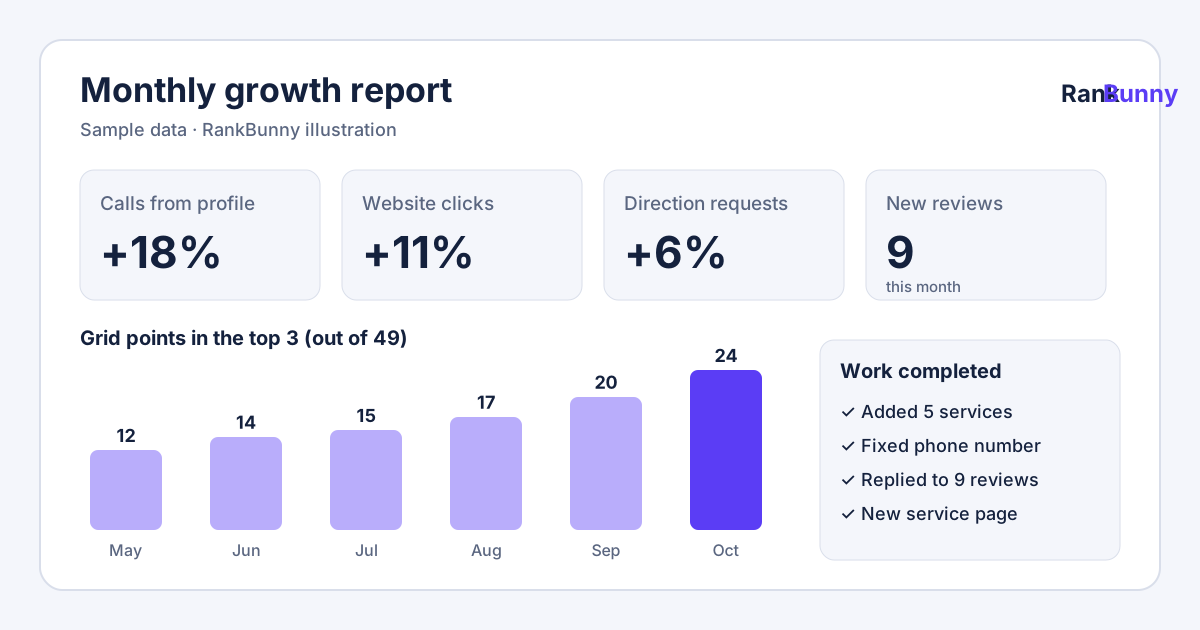
Each report opens with a short summary written for a busy owner, for example: "More people found you for 'water heater repair' this month, mostly in the north of your area, after we added the service and a matching website page. Calls from your profile were similar to last month. Next month we will focus on reviews." Below the summary are simple charts for each area, with this month compared with last month and the same month last year where data exists.
Completed work is marked on the charts, so you can see what happened after each change.
The profile health score, explained openly
Your report includes a simple profile health score. It is not a secret formula: it is the share of our audit checks your profile currently passes, with more important checks, such as correct contact details and categories, counting more. You can see every check and whether it passed, so you always know why the score moved.
The score measures how complete and accurate your profile is. It is not a prediction of your ranking and it is not a number from Google.
How to check your own Google Business Profile performance
You can see some of this data yourself. Sign in to the Google account that manages your profile, search for your business name on Google, and open the performance section. Google shows interactions such as calls, direction requests, website clicks and the search terms that showed your profile, for a date range you choose. Google notes that search term data is updated at the start of each month and may take a few days to appear.
What Google does not show you is where you rank across your area, how you compare with competitors, or which of your changes made a difference. That is the gap RankBunny's growth tracking fills.
How to judge whether local SEO is working
- Look at trends over several months, not single weeks. Seasonal businesses should compare with the same month last year.
- Check visibility and actions together. Better rankings with no change in calls or clicks may mean the profile needs to be more convincing, for example better photos, reviews or description.
- Separate causes where you can. Changes on the timeline help, but outside factors such as seasons, weather, advertising or a competitor closing also affect results.
- Keep the end goal in view: more of the right customers contacting you.
Local SEO growth tracking: frequently asked questions
How do I measure local SEO results?
Track your visibility in Google's local results across your area, the actions people take on your Google Business Profile such as calls, direction requests and website clicks, your reviews, and your actual inquiries. Compare month over month and keep a record of the work done.
How do I know if my local SEO is working?
Look for steady improvement over several months in where you appear for your important searches, together with more calls, website clicks, direction requests or bookings. If rankings improve but customer actions do not, the profile or website may need to be more convincing.
What metrics does Google Business Profile show?
Google's performance report can include profile views, the search terms that showed your profile, calls, direction requests, website clicks, messages and bookings, depending on your business type and settings.
How often will I get a report?
You get a full report every month. Important changes, such as a sudden ranking drop or a profile issue, are flagged when we find them rather than waiting for the monthly report.
What is the profile health score?
It is the share of RankBunny's audit checks that your profile passes, with more important checks counting more. Every check is listed, so you can see why the score changed. It is not a ranking prediction and does not come from Google.
Do you need access to my Google Business Profile for reporting?
Yes, for the profile engagement numbers such as calls and website clicks, which only owners and managers can see. You can connect your profile and remove our access at any time. Ranking and grid tracking do not need access.
Can you track phone calls from my Google Business Profile?
Google's performance report includes taps on the call button from your profile. It does not record whether the call was answered or became a customer, so if you use your own call tracking or booking system, we can include that data too.
How long before I see results in my reports?
Some changes, such as fixing errors, can show within weeks. Review growth, content and local mentions usually build over several months. The report shows what changed each month.
Why did my calls drop when my rankings went up?
Calls depend on more than position, including seasons, your rating and reviews, photos, hours and competitors' offers. We look at these factors in the report and suggest what to check.
Can I compare results with last year?
Yes, where the data exists. Year-over-year comparison is especially useful for seasonal businesses, such as heating and cooling or landscaping.
Is the report written for business owners or marketers?
Business owners. Each report starts with a short plain-English summary of what changed, why it probably changed and what happens next, with the detailed charts below for anyone who wants them.
Do you report work completed each month?
Yes. Every completed task from your action plan is listed in the report and marked on the charts, so you can see what was done and what happened afterward.
Related RankBunny features
Google Business Profile Audit
Find the gaps in your profile that are most likely holding back your visibility on Google Maps.
Local Competitor Analysis
Compare your Google Business Profile with the local businesses showing up ahead of you.
Google Maps Rank Tracker
Track where your business appears on Google Maps for the searches that bring you customers.
Local Search Grid
See a map of where you appear across your service area, and where you drop out.
Local SEO Action Plan
A short, prioritized list of what to fix next, why it matters and who will do it.
Sources and further reading
Facts about how Google works on this page come from Google's own help pages. We review this page when Google changes its guidance.