Local Competitor Analysis
Local Competitor Analysis: See Why Competitors Show Up Ahead of You on Google Maps
When the same few businesses keep appearing above you on Google Maps, there is usually a visible reason. RankBunny compares your Google Business Profile, reviews and website with theirs, side by side, so you can see the differences that are most likely to matter.
Get a free visibility checkRead the FAQWhat is a local competitor analysis?
A local competitor analysis compares your business's online presence with the businesses that appear ahead of you in Google's local results for the searches that bring you customers. It looks at public information such as Google Business Profile categories, listed services, review count, rating and recency, photos, hours and the website each profile links to, and highlights where you differ.
Who are your real local competitors?
Your search competitors are not always the businesses you think of as rivals. On Google Maps, your competitors are whoever appears in the local results for the searches your customers type, near the places your customers search from. A dental practice may compete with a different set of practices for "emergency dentist" than for "teeth whitening", and that set can change from one neighborhood to the next.
That is why RankBunny starts with your important searches and your service area, not with a list of names. We look at the businesses that actually appear for those searches and compare you with the ones that show up most often. If you already know who you lose work to, we add them too.
What the competitor comparison looks at
The comparison uses information anyone can see on a public Google Business Profile and website. It does not use private data.
| Area | What we compare | Why it matters |
|---|---|---|
| Categories | Primary and secondary categories | Categories affect which searches a profile is considered relevant for. |
| Services | Number and type of services listed | A competitor that lists "drain cleaning" may match that search more closely than one that does not. |
| Reviews | Review count, average rating, how recent the latest reviews are, and whether the owner replies | Google lists reviews as part of prominence, and customers read them before calling. |
| Photos | How many photos, what they show, and how recent they are | Real, recent photos help customers decide and show the business is active. |
| Profile completeness | Hours, description, attributes, booking or contact options | Complete, accurate information helps Google match your profile to searches. |
| Website | Whether the linked page loads well on mobile and covers the services and area | A relevant, consistent website supports the profile and helps visitors convert. |
| Visibility | Where each business appears on a local search grid | Shows whether a competitor wins everywhere or only near its own location. |
Why does my competitor rank higher on Google Maps?
Google says local results depend mainly on relevance, distance and prominence. In practice, a competitor usually shows up ahead of you for one or more of these reasons:
- They are closer to where the search happened. This is common and is not something you can change, which is why we look at results across your whole area rather than from one spot.
- Their primary category is a closer match to the search.
- They list the specific service the customer searched for, and you do not.
- They have more reviews, more recent reviews, or a higher rating, which can make them more prominent and more likely to be chosen.
- Their website supports the profile with clear service pages for the area.
- They are better known overall, for example mentioned and linked from more local websites.
Sometimes the reason is not visible at all. Google does not publish its full ranking method, so a comparison shows the likely reasons, not certain ones. We say so when the evidence is weak.
How RankBunny runs a local competitor analysis
- Choose your important searches. We agree on the searches that bring you the most valuable customers, for example "water heater repair" rather than only "plumber".
- Find who shows up. We check the local results for those searches across your service area and list the businesses that appear most often.
- Compare profiles side by side. We collect the public profile and website details for you and your main competitors.
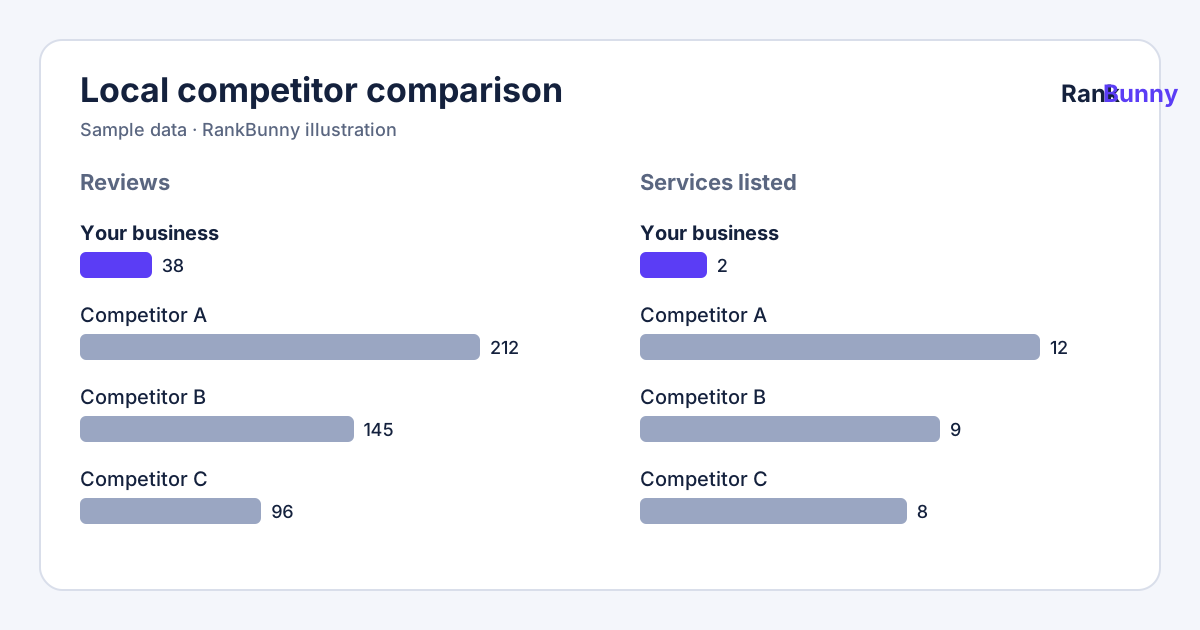
- Highlight the gaps that matter. Each difference comes with its evidence, for example "the three businesses ahead of you list between 8 and 12 services; you list 2".
- Turn gaps into actions. The useful differences go into your local SEO action plan, ranked by likely impact and effort.
How to compare Google Business Profiles yourself
You can do a basic version of this with a phone and a notepad:
- Search for your main service plus your town in Google Maps, for example "roof repair Irving TX".
- Write down the first three businesses that appear (ignore ads marked "Sponsored").
- Open each profile and note the primary category (shown under the name), number of reviews, rating, date of the newest review, and roughly how many photos there are.
- Scroll to the services or products section and note what they list.
- Visit each website and see whether there is a page for the service you searched for.
- Do the same for your own profile and compare.
Keep in mind that results depend on where you are standing. If you search from your office, you will often see yourself higher than a customer across town would. Our Google Maps rank tracker and local search grid check from many locations to avoid that bias.
What to do with the results
Competitor analysis is for finding your own next step, not for copying another business. Good uses include:
- Adding services you genuinely offer but have not listed.
- Choosing a more accurate primary category, if a better one fits your main business.
- Building a steady, honest review request habit, so recent customers are asked to share their experience.
- Adding real photos of your work, team and premises.
- Creating website pages for important services and areas you serve.
Things to avoid: adding categories or keywords that do not describe your business, buying or incentivizing reviews, and creating extra profiles for locations you do not staff. These go against Google's guidelines and can lead to suspensions.
Local competitor analysis: frequently asked questions
What is a local competitor analysis?
It is a comparison of your Google Business Profile, reviews and website with the businesses that appear ahead of you in Google's local results for the searches that matter to you. It shows where you differ so you can decide what to improve.
Why does my competitor rank higher than me on Google Maps?
The most common reasons are that they are closer to the person searching, their primary category or services match the search better, they have more or more recent reviews, or their website supports their profile better. Google's full ranking method is not public, so analysis shows likely reasons rather than certain ones.
How do I find my local competitors on Google Maps?
Search for your main services plus your town in Google Maps and note which businesses appear in the first results, ignoring ads. Repeat for several searches and from different parts of your area, because results change with the searcher's location.
Can I see my competitor's Google Business Profile insights?
No. Performance reports such as calls, direction requests and website clicks are only visible to the profile's owners and managers. A competitor analysis uses public information such as categories, services, reviews and photos.
How many competitors should I compare against?
Three to five is usually enough: the businesses that appear most often ahead of you for your most valuable searches. Comparing against too many makes it harder to see clear patterns.
Should I copy my competitor's categories?
Only if the category accurately describes your business. Google's guidelines say to use as few categories as possible to describe your core business. Adding categories you do not fit can hurt trust and may lead to profile edits or suspension.
Do more reviews mean a higher ranking?
Google lists reviews among the information that contributes to prominence, so reviews can help, but they are one factor among many. Review recency, rating and your replies also influence whether customers choose you.
Is it allowed to analyze competitors' Google profiles?
Yes. Looking at public business information that anyone can see on Google is normal market research. RankBunny does not access private data or log in to competitors' accounts.
How often should I do a competitor analysis?
Every three months is a sensible routine for most local businesses, with a quick check whenever you notice a sudden change in your visibility or a new competitor opening nearby.
What if my competitor is breaking Google's rules?
If a competitor uses a fake address, keyword-stuffed name or fake reviews, you can suggest an edit or report it through Google. We focus first on improving your own profile, since reports may take time and the outcome is up to Google.
Does my website affect how I compare with competitors?
Yes. The website linked from your profile helps customers decide and helps Google understand your services and location. We compare whether each competitor's site covers the services and areas you are competing for.
Does RankBunny use AI for competitor analysis?
The comparison itself uses collected public data and clear rules. We use AI to help summarize the differences in plain English, and each summary links back to the evidence.
Related RankBunny features
Google Business Profile Audit
Find the gaps in your profile that are most likely holding back your visibility on Google Maps.
Google Maps Rank Tracker
Track where your business appears on Google Maps for the searches that bring you customers.
Local Search Grid
See a map of where you appear across your service area, and where you drop out.
Local SEO Action Plan
A short, prioritized list of what to fix next, why it matters and who will do it.
Local SEO Growth Tracking
A plain monthly report on rankings, calls, website clicks, reviews and the work completed.
Sources and further reading
Facts about how Google works on this page come from Google's own help pages. We review this page when Google changes its guidance.