Local Search Grid
Local Search Grid: See Where You Show Up on Google Maps Across Your Service Area
Your Google Maps ranking is not one number. It changes from street to street. A local search grid checks your position from many points around your business and shows the results on a map, so you can see where customers find you and where they find someone else.
Get a free visibility checkRead the FAQWhat is a local search grid?
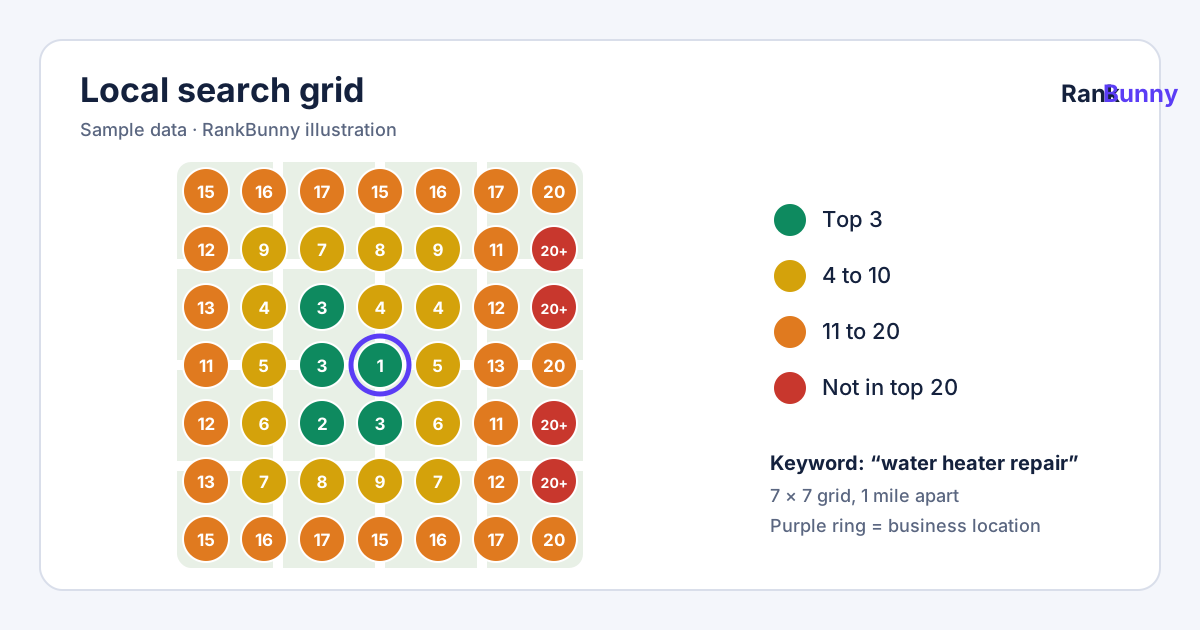
A local search grid, also called a geo-grid, is a set of evenly spaced points laid over a map of your service area. The same keyword is searched as if from each point, and your Google Maps position at each point is shown as a color-coded number. The result is a picture of how your visibility changes with distance and neighborhood, rather than a single ranking taken from one spot.
Why a single ranking number is not enough for local SEO
Google says distance between the searcher and the business is one of the main factors in local results. That means a business can be first in the map results for someone two blocks away and missing entirely for someone five miles away. A single ranking check, taken from one spot, hides that.
A local search grid shows the pattern. It answers practical questions such as:
- How far from my location do I still appear in the top three?
- Which parts of my service area am I missing, even though I serve them?
- Is a competitor strong everywhere, or only near its own office?
- Did my visibility spread wider after we fixed my profile?
How to read a local search grid map
Each point on the grid shows the position your business appeared in for that search at that location. Colors make the pattern easy to scan:
| Color | Meaning | What it suggests |
|---|---|---|
| Green | Positions 1 to 3 | Customers searching here are likely to see you in the first few map results. |
| Yellow | Positions 4 to 10 | You appear, but customers may need to scroll or tap "more places". |
| Orange | Positions 11 to 20 | You are present but unlikely to be noticed by most searchers. |
| Red | Not found in the checked results | Customers searching from here are unlikely to find you for this keyword. |
A common pattern is a green center around your address that fades to red farther out. The goal is usually to widen the green and yellow area across the neighborhoods you serve, not to be first everywhere, which is rarely realistic.
How RankBunny builds your local search grid
- Pick a keyword. Grids are run one keyword at a time, starting with your most valuable searches.
- Set the grid size and spacing. We choose the number of points and the distance between them to fit your service area. A dense city practice needs tighter spacing than a rural contractor covering several towns.
- Search from each point. The keyword is searched as if from each point using a third-party search data provider, and your position is recorded along with the businesses ahead of you.
- Show the map. You see the color-coded grid, a simple summary such as how many points show you in the top three, and the competitors that appear most often.
- Repeat over time. Grids are re-run on a schedule so you can compare this month's map with earlier ones in your growth report.
How to improve weak areas on your grid
You cannot move your business closer to every customer, but you can make your profile a stronger match and better known. The steps that most often help widen visibility are:
- Match the search. Make sure your primary category and services clearly cover the keyword. See the Google Business Profile audit.
- Build steady, genuine reviews from real customers, including those in the weaker areas, and reply to them.
- Support the profile with your website: clear service pages, and genuine location pages for areas you serve, with real details rather than copied text.
- Earn local mentions and links, for example from local associations, suppliers, sponsorships and community sites.
- Keep the profile active with accurate hours, new photos and updates.
Avoid shortcuts that break Google's guidelines, such as adding a fake address in another neighborhood or keywords to your business name. They can lead to suspension and lose the visibility you already have.
Local search grids for service-area businesses
If you travel to customers, such as a plumber, cleaner or mobile mechanic, Google's guidelines say you should hide your street address and set a service area instead. A grid is especially useful for you, because it shows whether you actually appear in the towns you list as your service area. A service area tells Google where you work, and the grid shows where to build visibility next.
Local search grid: frequently asked questions
What is a local search grid?
It is a set of evenly spaced points over a map of your service area. Your Google Maps position for a keyword is checked from each point and shown in color, so you can see where you are visible and where you are not.
What is a geo-grid rank tracker?
Geo-grid rank tracker is another name for a local search grid tool. It tracks local rankings from many locations at once instead of a single location.
Why do I rank well near my business but not across town?
Google lists distance between the searcher and the business as one of the main factors in local results. Near your address you have a distance advantage; farther away, competitors closer to the searcher or with stronger profiles often appear first.
How do I rank on Google Maps in other parts of my city?
Make sure your categories and services clearly match the search, build genuine reviews, create helpful website pages for the services and areas you serve, earn local mentions and links, and keep your profile active. These steps build on each other, and the grid shows your visibility spreading as they take effect.
What grid size should I use?
It depends on your service area. A business serving a few square miles of a dense city needs tightly spaced points, while a contractor covering several towns needs wider spacing. We set the size and spacing to match where your customers actually are.
How often should I run a local search grid?
Monthly is usually enough to see meaningful change for each important keyword. Running grids more often mostly shows normal short-term variation.
Does a grid show what my customers see?
No tool can show what every single person sees. Results vary with precise location, device, search history and time. A grid gives a consistent, repeatable sample that is far more reliable than searching from one phone.
Can I see competitors on the grid?
Yes. For each point, we record the businesses that appear ahead of you, so you can see which competitors are strongest in which areas.
Does setting a service area make me appear in all those towns?
Not by itself. A service area tells customers where you work. A grid shows whether you actually appear in the towns you serve, and where to build visibility next.
Should I open a virtual office to rank in another area?
No. Google's guidelines do not allow profiles for virtual offices or mailboxes that are not staffed real locations. Using one can lead to suspension. Focus on genuine relevance and prominence instead.
What does "not found" mean on the grid?
It means your business did not appear in the results checked from that point for that keyword. It is usually where the biggest opportunity is, especially in areas you actively serve.
Is a local search grid useful for businesses with a storefront?
Yes. Even if most customers come to you, a grid shows how far your visibility reaches and whether nearby competitors dominate certain neighborhoods.
Related RankBunny features
Google Business Profile Audit
Find the gaps in your profile that are most likely holding back your visibility on Google Maps.
Local Competitor Analysis
Compare your Google Business Profile with the local businesses showing up ahead of you.
Google Maps Rank Tracker
Track where your business appears on Google Maps for the searches that bring you customers.
Local SEO Action Plan
A short, prioritized list of what to fix next, why it matters and who will do it.
Local SEO Growth Tracking
A plain monthly report on rankings, calls, website clicks, reviews and the work completed.
Sources and further reading
Facts about how Google works on this page come from Google's own help pages. We review this page when Google changes its guidance.